

Takeover Mobile: Spezifikationen
Inhalt:
Deutsch
Auch auf Mobile Devices bieten wir ein Takeover an. Diese ist zwischen der Seiten-Navigation am oberen Bildschirmrand und den eigentlichen Content zu sehen. Wir reservieren einen Großteil der Bildschirmhöhe für das Takeover.
Die Höhe des sichtbaren Bereichs ist abhängig vom verwendeten Mobiltelefon – wir haben unten eine Grafik vorbereitet, in der der sichtbare Bereich für bekannte Telefone zu sehen ist.
Wir benötigen:
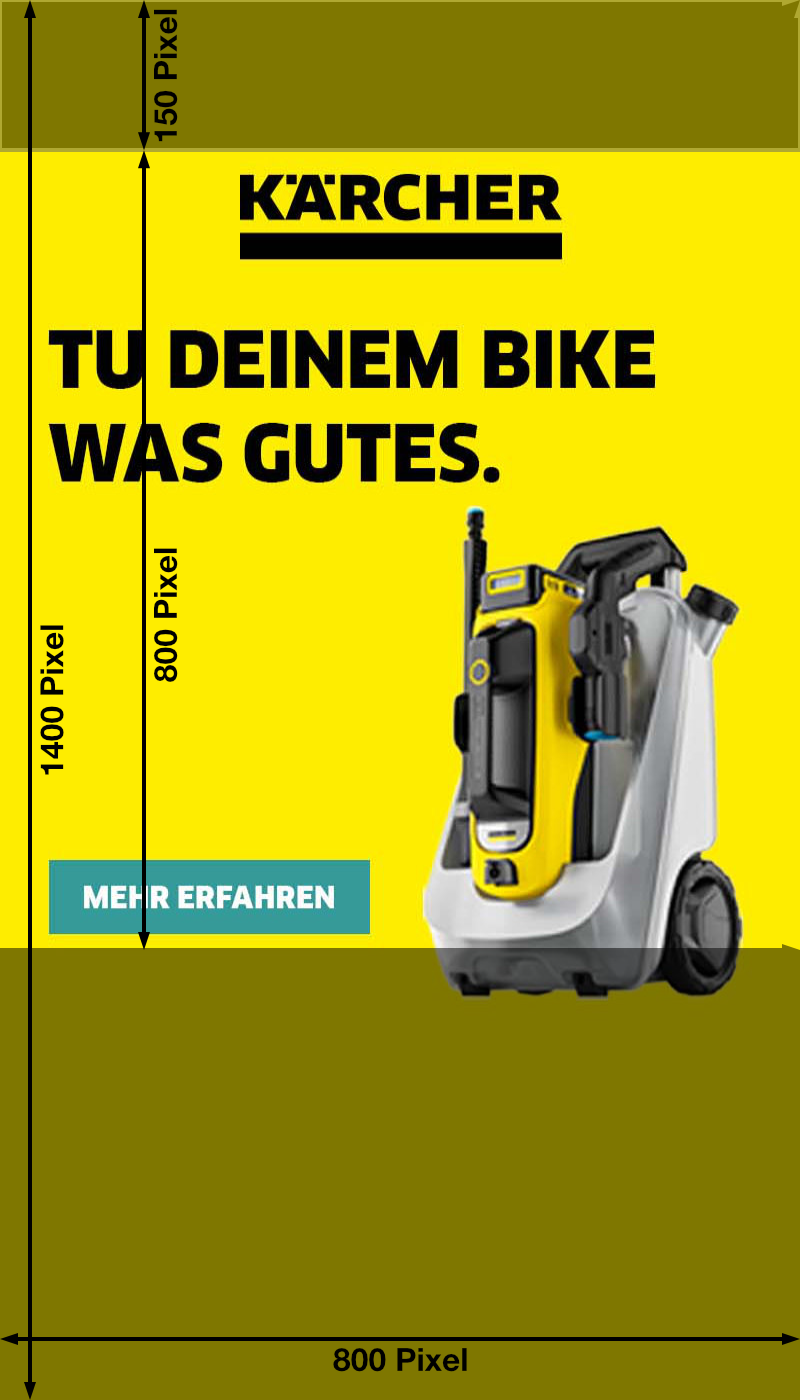
- Datei mit 800 Pixeln Breite und 1400 Pixeln Höhe.
- Dateiformat: JPEG, progressive, maximal 70 KBytes
- Relevanter Content sollte sich vertikal innerhalb des Bereichs von 150 Pixel bis 950 Pixel befinden (von oben gezählt)!
Wichtig (Bitte lesen!)
Der obere Bereich, in dem die Seiten-Navigation zu sehen ist ist 150 Pixel hoch und muss in der Grafik enthalten sein (hier kann man bei Bedarf etwas „verstecken“ was erst beim Scrollen sichtbar wird); im einfachsten Fall ist dort nur Hintergrund zu sehen.
Da unzählige verschiedene Bildschirmauflösungen bei Telefonen existieren, gibt es einen eingeschränkten Bereich („Safe Area“), der auf den allermeisten Telefon sichtbar ist. In diesem Bereich sollten die wichtigsten Inhalte des Takeovers untergebracht werden.
Die Safe Area beginnt (von oben gesehen) bei 150 Pixel und geht bis 950 Pixel – sie ist also 800 Pixel breit und 800 Pixel hoch.
Wir haben diesen Bereich in der Beispielgrafik markiert. Außerdem haben wir einige Screenshots von häufig anzutreffenden Bildschirmauflösungen gemacht – diese können als Anhaltspunkt für die Gestaltung und die Position der Safe Area dienen.
Die Grafik füllt horizontal den Bildschirm komplett aus; vertikal überlagert irgendwann der eigentliche Content die Grafik unterhalb der Safe Area.
Template herunterladen
Vorschau: iPhone 15/16 Pro Max

Vorschau: iPhone 15/16

Vorschau: iPhone SE

English
We also offer a takeover for mobile devices. It can be seen between the page navigation at the top of the screen and the actual content. We reserve a large part of the screen height for the takeover.
The height of the visible area depends on the mobile phone used – we have prepared a graphic below showing the visible area for known phones.
We need:
- File with 800 pixels width and 1400 pixels height.
- File format: JPEG, progressive, maximum 70 KBytes
- Relevant content should be located vertically within the range of 150 pixels to 950 pixels (counting from the top)!
Important (please read!)
The upper area in which the page navigation can be seen is 150 pixels high and must be included in the graphic (if necessary, you can ‘hide’ something here that only becomes visible when scrolling); in the simplest case, only the background can be seen there.
As there are countless different screen resolutions for phones, there is a restricted area (‘safe area’) that is visible on the vast majority of phones. The most important content of the takeover should be placed in this area.
The safe area starts at 150 pixels (seen from top) and goes up to 950 pixels – so it is 800 pixels wide and 800 pixels high.
We have marked this area in the example graphic. We have also taken some screenshots of frequently encountered screen resolutions – these can serve as a guide for the design and position of the safe area.
The graphic completely fills the screen horizontally; vertically, the actual content overlaps the graphic below the safe area at some point.
Download Template
Preview: iPhone 15/16 Pro Max
Preview: iPhone 15/16
Preview: iPhone SE
Back to the Takeover-Overview